Neo4j Integration Tutorial

This tutorial demonstrates how to integrate GraphFrames with Neo4j, enabling you to offload and precompute expensive algorithms like connected components onto Spark where they can scale linearly by taking advantage of Spark's distributed DataFrames. Neo4j + Spark + GraphFrames provides graph database persistence with distributed graph analytics to scale expensive algorithms in a cost effective manner. It can be used with custom Pregel algorithms to implement arbitrary algorithms at scale that would otherwise be expensive or impossible on Neo4j.
In this tutorial we will:
- Set up Neo4j using Docker
- Load Stack Exchange data into Neo4j
- Read graph data from Neo4j into GraphFrames
- Run distributed graph algorithms (Connected Components)
- Write enriched results back to Neo4j
This is a complete pipeline for bidirectional data flow between Neo4j and GraphFrames you can use as the basis for many different workflows.
Why Integrate Neo4j with GraphFrames?
Neo4j excels at:
- ACID transactions
- Real-time graph queries
- Complex path traversals
- Interactive graph exploration
Spark GraphFrames excels at:
- Distributed graph analytics at scale
- Batch processing of billions of edges
- Integration with Spark ML pipelines
- Complex pattern matching with motif finding
One is a natural complement of the other. GraphFrames can be used to scale expensive algorithms that would be difficult or expensive on Neo4j: running more cores for expensive analytic algorithms means higher Neo4j license fees. By contrast, Spark and GraphFrames are free and open source software under the Apache 2.0 License.
Prerequisites
Before starting, ensure you have:
- Docker: For running Neo4j (install from docker.com)
- GraphFrames 0.12+:
pip install graphframes-py - Apache Spark 4.x+: Compatible with your Python version
- Stack Exchange Dataset: Follow the Data Setup Tutorial to download
Check your versions:
docker --versionArchitecture Overview
Our data pipeline:
flowchart TD
    A["Neo4j Database<br/>(Docker Container)"] --> B["Read via Neo4j Connector"]
    B --> C["PySpark DataFrame"]
    C --> D["GraphFrames Connected Components"]
    D --> E["Write via Neo4j Connector"]
    E --> F["Neo4j Database<br/>(updated with component)"]
Step 1: Set Up Neo4j with Docker
I have automated the setup and loading of data in Neo4j via a built-in graphframes neo4j command so as to present the Neo4j integration as you would might use in practice: reading an existing Neo4j database into PySpark and GraphFrames. First, let's start a Neo4j instance via Docker. We'll use Neo4j Community Edition with APOC plugins for data import capabilities. The setup command creates the volume directories, starts the container, and waits until Neo4j actually answers queries:
graphframes neo4j setupIt is safe to re-run, so an existing container is started rather than replaced. --password, --http-port, --bolt-port, --container-name and --heap are all configurable; When you are finished, Step 6 tears it back down: graphframes neo4j remove.
To perform these steps manually, just create the folders and start the neo4j container:
mkdir -p /tmp/neo4j-data/data /tmp/neo4j-data/logs /tmp/neo4j-data/import /tmp/neo4j-data/plugins

docker run -d --name neo4j-graphframes -p 7474:7474 -p 7687:7687 -v /tmp/neo4j-data/data:/data -v /tmp/neo4j-data/logs:/logs -v /tmp/neo4j-data/import:/var/lib/neo4j/import -v /tmp/neo4j-data/plugins:/plugins -e NEO4J_apoc_import_file_enabled=true -e NEO4J_apoc_export_file_enabled=true -e NEO4J_AUTH=neo4j/graphframes123 -e NEO4J_PLUGINS='["apoc"]' -e NEO4J_dbms_memory_heap_initial__size=1G -e NEO4J_dbms_memory_heap_max__size=2G neo4j:community
Connection Details:
- Browser UI: http://localhost:7474
- Bolt Protocol: neo4j://localhost:7687
Verify Neo4j is running:
docker logs neo4j-graphframesWait for the message: Started.
You can also visit http://localhost:7474 and log in with the credentials above.
Step 2: Download the Stack Exchange Data
See the Data Setup Tutorial for instructions on downloading and processing the Stack Exchange data.
This creates two Parquet datasets in the standard GraphFrames shape:
python/graphframes/tutorials/data/stats.meta.stackexchange.com/
├── Nodes.parquet          # All node types, one unified schema, with a UUID 'id'
└── Edges.parquet          # All edges: src, dst, relationship
Both use a unified schema. Nodes.parquet carries every column of every node type — a Badge row has a Title column, it is just null — with a Type column naming the type and a UUID id. Edges.parquet has exactly three columns: src, dst and relationship, where src/dst are the UUID ids from Nodes.parquet.
For stats.meta.stackexchange.com that is 129,751 nodes:
| Type | Count |
|---|---|
| Badge | 43,029 |
| Vote | 42,593 |
| User | 37,709 |
| Answer | 2,978 |
| Question | 2,025 |
| PostLinks | 1,274 |
| Tag | 143 |
and 97,104 edges:
| relationship | Count | Shape |
|---|---|---|
| Earns | 43,029 | User → Badge |
| CastFor | 40,701 | Vote → Question or Answer |
| Tags | 4,427 | Tag → Question or Answer |
| Answers | 2,978 | Answer → Question |
| Posts | 2,767 | User → Answer |
| Asks | 1,934 | User → Question |
| Links | 1,180 | Post → Post |
| Duplicates | 88 | Post → Post |
Step 3: Load Stack Exchange in Neo4j
The graphframes neo4j load command creates the the nodes, edges and indices — and prints their verification counts at the end. Point it elsewhere with --data-dir, --site and the --neo4j-* connection options.
graphframes neo4j loadThen use the Cypher console to query the data at http://localhost:7474/browser/:
MATCH (s:Node)-[r]->(t:Node)
RETURN s, r, t
LIMIT 10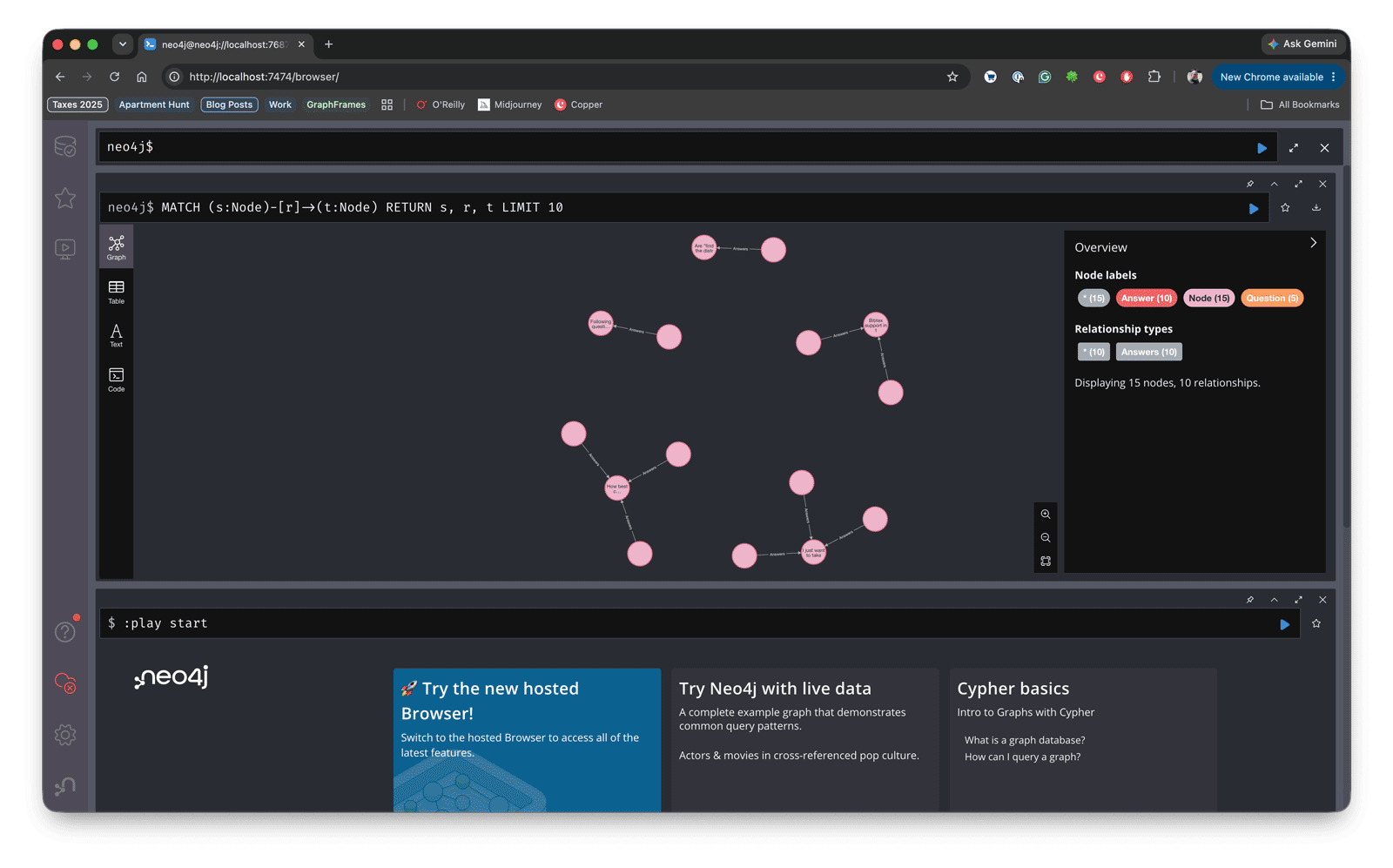
MATCH (:Node)-[r]->(:Node)
RETURN type(r) AS relationship, count(*) AS count
ORDER BY count DESC
You should see 129,751 nodes and all 97,104 relationships, matching the tables in Step 2 exactly:
+------------+-----+
|relationship|count|
+------------+-----+
|       Earns|43029|
|     CastFor|40701|
|        Tags| 4427|
|     Answers| 2978|
|       Posts| 2767|
|        Asks| 1934|
|       Links| 1180|
|  Duplicates|   88|
+------------+-----+
Because both loads MERGE, running the whole thing a second time produces these same numbers rather than doubling them.
Note:cypher()uses the connector'squeryoption, which rewrites your query to partition it. That means it rejects a trailingSKIP/LIMIT— take the top N withDataFrame.limit()instead of in Cypher.
Step 4: Import the Graph from Neo4j in Spark / GraphFrames
Everything from here is python/graphframes/tutorials/neo4j.py. It needs both the GraphFrames and the Neo4j connector jars on the classpath, so run it with spark-submit:
spark-submit --packages io.graphframes:graphframes-spark4_2.13:0.12.1,org.neo4j.connectors:spark:6.0.0-s_2.13 python/graphframes/tutorials/neo4j.pyOn Spark 3.5, use graphframes-spark3_2.12:0.12.1 and org.neo4j:neo4j-connector-apache-spark_2.12:5.4.3_for_spark_3 instead — the connector's 6.0.0 line dropped Spark 3.5 support, and PySpark 3.5 ships Scala 2.12, not 2.13. Both coordinates must agree on the Spark major and Scala version, or you get a NoClassDefFoundError instead of a connection.
The script opens with the same connection settings the loader used, and the same shared label:
import pyspark.sql.functions as F
from pyspark.sql import DataFrame, SparkSession

from graphframes.pg import EdgePropertyGroup, PropertyGraphFrame, VertexPropertyGroup

NEO4J_FORMAT = "org.neo4j.spark.DataSource"

NEO4J = {
    "url": "neo4j://localhost:7687",
    "authentication.basic.username": "neo4j",
    "authentication.basic.password": "graphframes123",
    "database": "neo4j",
}

LABEL = "Node"
PARTITIONS = 8

# The eight relationship types `graphframes neo4j load` creates - see the tables above.
RELATIONSHIP_TYPES = ["Earns", "CastFor", "Tags", "Answers", "Posts", "Asks", "Links", "Duplicates"]

spark = SparkSession.builder.appName("Neo4j + GraphFrames").getOrCreate()
# Connected Components checkpoints as it iterates, so Spark needs somewhere to put them.
spark.sparkContext.setCheckpointDir("/tmp/graphframes-checkpoints/neo4j")Query Neo4j from PySpark
def cypher(query: str, count_query: str = "") -> DataFrame:
    reader = spark.read.format(NEO4J_FORMAT).options(**NEO4J).option("query", query)
    if count_query:
        reader = reader.option("query.count", count_query).option("partitions", str(PARTITIONS))
    return reader.load()
A query read is single-partition unless you tell the connector how many rows to expect. The two big reads below pass a count_query and get PARTITIONS workers; the small verification queries at the end leave it off, where one partition is fine.
Note: the connector rewrites aqueryread in order to partition it, so it rejects a trailingSKIP/LIMIT. Take the top N withDataFrame.limit()instead of in Cypher.
Model the Graph as a PropertyGraphFrame
Neo4j's :Node label covers seven Stack Exchange node types and eight relationship types (see Step 2 and Step 3 above). Reading all of that into one untyped vertex DataFrame and one untyped edge DataFrame — then handing both straight to GraphFrame — throws away that structure the moment it leaves Neo4j. A PropertyGraphFrame keeps it: one VertexPropertyGroup per node type, and one EdgePropertyGroup per relationship type, wired up exactly like the "Shape" column in the Step 2 table. Cypher aliases do the rest — return columns named id, Type, src, dst and relationship, and the DataFrames arrive in exactly the shape the property groups want.
vertices = cypher(
    f"MATCH (n:{LABEL}) RETURN n.id AS id, n.Type AS Type",
    f"MATCH (n:{LABEL}) RETURN count(n) AS count",
).cache()
edges = cypher(
    f"MATCH (s:{LABEL})-[r]->(t:{LABEL}) "
    "RETURN s.id AS src, t.id AS dst, type(r) AS relationship",
    f"MATCH (:{LABEL})-[r]->(:{LABEL}) RETURN count(r) AS count",
).cache()


def _nodes_of_type(node_type: str) -> DataFrame:
    return vertices.filter(F.col("Type") == node_type).select("id")


def _edges_of_type(relationship: str) -> DataFrame:
    return edges.filter(F.col("relationship") == relationship).select("src", "dst")


def _edge_group(relationship: str, src_group: VertexPropertyGroup, dst_group: VertexPropertyGroup):
    return EdgePropertyGroup(
        relationship,
        _edges_of_type(relationship),
        src_group,
        dst_group,
        is_directed=True,
        src_column_name="src",
        dst_column_name="dst",
    )
One VertexPropertyGroup per real node type, each named after its Type — ids are already globally-unique UUIDs, so apply_mask_on_id=False skips hashing them, and naming each group after its Type is what lets Step 4 below read Type straight off the projected graph with no join:
users = VertexPropertyGroup("User", _nodes_of_type("User"), "id", apply_mask_on_id=False)
badges = VertexPropertyGroup("Badge", _nodes_of_type("Badge"), "id", apply_mask_on_id=False)
votes = VertexPropertyGroup("Vote", _nodes_of_type("Vote"), "id", apply_mask_on_id=False)
questions = VertexPropertyGroup(
    "Question", _nodes_of_type("Question"), "id", apply_mask_on_id=False
)
answers = VertexPropertyGroup("Answer", _nodes_of_type("Answer"), "id", apply_mask_on_id=False)
post_links = VertexPropertyGroup(
    "PostLinks", _nodes_of_type("PostLinks"), "id", apply_mask_on_id=False
)
tags = VertexPropertyGroup("Tag", _nodes_of_type("Tag"), "id", apply_mask_on_id=False)CastFor, Tags, Links and Duplicates all connect to a Post — Stack Exchange's word for "a Question or an Answer" (see Step 2). EdgePropertyGroup needs one fixed vertex group per side, so those four relationship types need one dst/src group that means either, instead of the two each could mean:
post_data = vertices.filter(F.col("Type").isin("Question", "Answer")).select("id")
posts = VertexPropertyGroup("Post", post_data, "id", apply_mask_on_id=False)
posts shares its id space with questions and answers — unmasked ids pass through unchanged regardless of which group's name they are read through — so it is never itself part of a vertex projection; only the edge groups below reference it. Now build the property graph, one EdgePropertyGroup per row of the Step 2 relationship table:
NODE_TYPES = [
    users.name,
    badges.name,
    votes.name,
    questions.name,
    answers.name,
    post_links.name,
    tags.name,
]

property_graph = PropertyGraphFrame(
    [users, badges, votes, questions, answers, post_links, tags, posts],
    [
        _edge_group("Earns", users, badges),
        _edge_group("CastFor", votes, posts),
        _edge_group("Tags", tags, posts),
        _edge_group("Answers", answers, questions),
        _edge_group("Posts", users, answers),
        _edge_group("Asks", users, questions),
        _edge_group("Links", posts, posts),
        _edge_group("Duplicates", posts, posts),
    ],
)
Matching on :Node — the shared label, not the type labels — is what makes the two Cypher reads above cover every node and every relationship in the graph, instead of one query per type. Splitting vertices seven ways and edges eight ways afterwards costs nothing extra in Neo4j: both are cached DataFrames, filtered locally by Spark.
Project, Validate and Count
to_graphframe() never hands you the whole property graph implicitly — you always name the vertex and edge property groups you want, which doubles as documentation: this call says exactly which parts of the Stack Exchange graph feed the algorithm that follows. Connected Components is meant to answer "how does the whole graph connect", so this projection includes every node type and every relationship (posts is deliberately left out — it would just add duplicate copies of the questions and answers ids already there); a narrower question — say, how users, questions and answers connect through content alone — would instead pass edge_property_groups=["Asks", "Posts", "Answers"] and leave CastFor (votes) and Earns (badges) out.
graph = property_graph.to_graphframe(
    vertex_property_groups=NODE_TYPES, edge_property_groups=RELATIONSHIP_TYPES
)
graph.validate()
print(f"Vertices: {graph.vertices.count():,}   Edges: {graph.edges.count():,}")
validate() checks the two things that would otherwise fail silently or blow up mid-algorithm: no duplicate vertex ids, and no edge pointing at a vertex that does not exist. Both are cheap to check up front and expensive to debug from a Connected Components stack trace.
Run Connected Components
Connected Components is the kind of expensive, iterative algorithm over an entire graph that is well suited to Spark's distributed compute. GraphFrames treats edges as undirected here, so a component is a set of nodes reachable from one another by any path.
components = (
    graph.connectedComponents()
    .withColumnRenamed("property_group", "Type")
    .select("id", "Type", "component")
    .cache()
)
print(f"Components found: {components.select('component').distinct().count():,}")

largest = components.groupBy("component").count().orderBy(F.desc("count")).first()["component"]
print("The largest component, by node type:")
components.filter(F.col("component") == largest).groupBy("Type").count().orderBy(
    F.desc("count")
).show()
Every vertex group above is named after its Type, so to_graphframe()'s property_group column — the one column besides id it keeps, and the one connectedComponents() carries through untouched alongside the new component column — already is Type. Renaming it is all that is needed; no join back onto vertices required.
On stats.meta.stackexchange.com this finds 40,115 components, and the distribution is the interesting part: one giant component holds 56,442 nodes — the connected core of the site — and everything else is tiny. Breaking that core down by type shows what it's made of:
+--------+------+
|    Type| count|
+--------+------+
|    Vote|40,700|
|   Badge| 9,836|
|  Answer| 2,978|
|Question| 2,024|
|    User|   771|
|     Tag|   133|
+--------+------+
Only 771 of 37,709 users are in it. The long tail is accounts that registered, earned an automatic badge, and never posted or voted — each one its own little island. That is a real finding about the site, and it is exactly the kind of question that is painful to answer with a traversal query and natural to answer with a distributed algorithm.
Step 5: Write the Results Back to Neo4j
Send only the key and the new property. The connector writes every column it is given, so a wider DataFrame means rewriting properties Neo4j already has.
(
    components.select("id", "component")
    .write.format(NEO4J_FORMAT)
    .options(**NEO4J)
    .mode("Overwrite")
    .option("labels", f":{LABEL}")
    .option("node.keys", "id")
    .save()
)
This is an upsert, and three separate things make it one:
Overwritemeans MERGE. The connector maps Spark's save modes onto Cypher:Overwritebecomes aMERGEonnode.keys,Appenda bareCREATE. Because everyidhere already exists, the MERGE matches rather than creates, and setscomponentin place — no new nodes, no dropped type labels, no disturbance to the properties loaded in Step 3.:Nodealone, not:Node:Question. Matching the shared label means this one write updates every node type at once.- The constraint from Step 3. Without the uniqueness constraint on
:Node(id), each of the 129,751 MERGEs would scan every:Nodein the database looking for its match. With it, each one is an index lookup. This is the whole reasongraphframes neo4j loadcreates the constraint before it writes anything. - SKIP/LIMIT are not allowed at the end of the query. The connector rewrites
queryreads to partition them. UseDataFrame.limit()instead. When you read via .option("query", ...), the connector doesn't run your Cypher verbatim. It treats it as a template and appends its own pagination clauses so it can split the read across Spark partitions:
Now ask a question that mixes the property graph with the result Spark just computed:
print("Most decorated users in the largest component:")
cypher(
    f"MATCH (u:User)-[:Earns]->(b:Badge) WHERE u.component = {largest} "
    "RETURN u.DisplayName AS user, count(b) AS badges ORDER BY badges DESC"
).limit(10).show(truncate=False)

spark.stop()
+---------------------------+------+
|user |badges|
+---------------------------+------+
|whuber |249 |
|gung - Reinstate Monica |220 |
|Glen_b |217 |
|amoeba |129 |
|Tim |119 |
+---------------------------+------+u.component came from Spark; [:Earns]->(b:Badge) came from Neo4j. All 129,751 nodes now carry a component, queryable alongside everything else — in the browser, from Cypher, or from an application. That is the round trip: Neo4j stored the graph, Spark did the work that does not fit on one machine, and Neo4j got the answer back.
Step 6: Cleanup!
When you are done, remove the container and its data:
graphframes neo4j removeTo do it by hand:
docker rm -f neo4j-graphframes && rm -rf /tmp/neo4j-dataTroubleshooting
The load finished but there are no relationships. The endpoint labels in relationship.source.labels / relationship.target.labels do not match any node. With save.mode = Match the connector skips unmatched endpoints silently. Confirm what your nodes actually carry:
docker exec neo4j-graphframes cypher-shell -u neo4j -p graphframes123 "CALL db.labels();"Node counts are an exact multiple of what you expect. A previous run used .mode("Append"), which is CREATE and ignores node.keys. MERGE cannot repair this afterwards — the duplicates have distinct internal ids and none of them carry the label the fixed script MERGEs on, so re-running adds another copy rather than collapsing them. Reset and reload:
docker exec neo4j-graphframes cypher-shell -u neo4j -p graphframes123 "MATCH (n) CALL (n) { DETACH DELETE n } IN TRANSACTIONS OF 10000 ROWS;"Or start over from scratch:
graphframes neo4j remove --yes && graphframes neo4j setup && graphframes neo4j loadkey not found: ArrayType(StringType,true). Connector 6.0.0's schema-optimization code cannot map array columns. Do not pass schema.optimization.node.keys on a write whose DataFrame contains one; create the constraint up front on an empty DataFrame, as in Step 3.
TransientException mentioning a deadlock wait cycle. Concurrent partitions are contending for the relationship-group lock of a dense node. Write relationships from a single partition, or repartition so no two partitions touch the same dense node.
Next Steps
- Swap
connectedComponents()for PageRank or Label Propagation and write those results back the same way - Project a narrower graph — e.g.
edge_property_groups=["Asks", "Posts", "Answers"]— to see how the site's content connects on its own, without votes or badges pulling everything into one giant component - Use motif finding to search for patterns that Cypher expresses awkwardly, then persist what you find. Then run another motif including that field!
- Point
graphframes neo4j load --siteat a larger site :)